


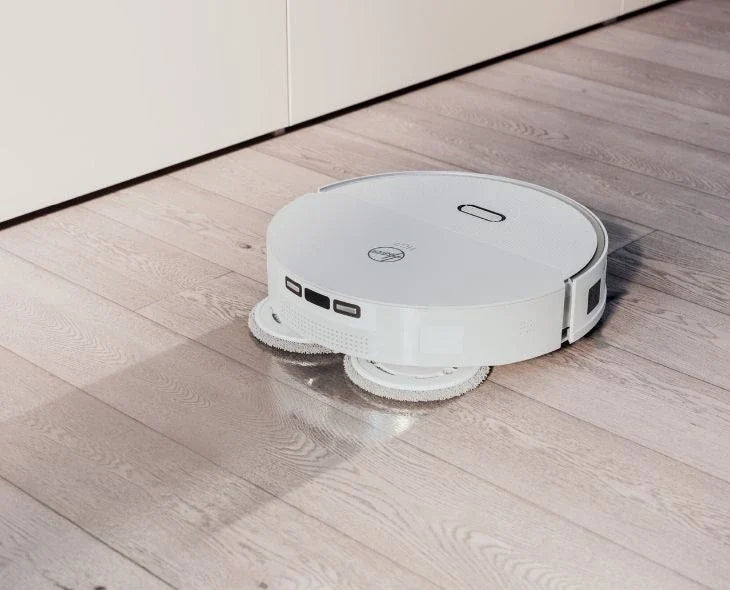
A robot vacuum and mop can take care of everyday dust, crumbs and light floor cleaning in one routine. But the best model for your home depends on more than suction power. Floor types, smart navigation, adjustable mopping settings and maintenance requirements all affect how convenient it is to use.
Hoover's HG2 Hydro TurboSlim range combines vacuuming and mopping with laser navigation, app controls and a slim 8.3 cm design. Here's what to consider when choosing the best robot vacuum and mop for your home.
What features should you look for in a robot vacuum and mop?
The best robot vacuum and mop should suit your floor types, home layout and cleaning habits. Prioritise effective suction, smart navigation, sufficient battery life and adjustable water flow. Easy maintenance and a design that fits your space are also important for convenient everyday cleaning.
1. Suction power and cleaning performance
Suction power affects how effectively a robot vacuum collects dust, crumbs, pet hair and other debris. It's particularly important in homes with pets or high-traffic areas where dirt accumulates quickly.
Suction is measured in Pascals (Pa), but a higher figure doesn't automatically guarantee better cleaning. Brush design, airflow and floor type also influence performance.
Look for adjustable suction settings that let you adapt cleaning intensity to different surfaces. For example, Hoover's HG2 Hydro TurboSlim range offers up to 5,000 Pa of suction power, with four cleaning modes: Low, Mid, High and Max.
2. Smart navigation and home mapping
Smart navigation helps a robot vacuum move around your home and plan cleaning routes. Models with laser navigation can scan their surroundings and create maps, making it easier to organise cleaning across different rooms.
Useful features include:
- Room mapping: Select specific rooms or areas to clean.
- No-go zones: Exclude areas containing cables, delicate objects or other obstacles.
- Customisable schedules: Set cleaning times for individual rooms or your entire home.
- App controls: Adjust cleaning settings and manage routines remotely.
Both Hoover HG2 models use Point Laser Navigation and the HG Robots app to create personalised maps and cleaning schedules.
Practical tip: Keep in mind that smart mapping doesn't necessarily mean a robot can detect and avoid every small object. Clearing loose cables, toys and clutter before cleaning can help prevent interruptions.
3. Battery life and automatic charging
Battery runtime determines how long a robot vacuum can clean before needing to recharge. Longer runtimes are particularly useful for larger homes or properties with multiple rooms.
When comparing models, check the advertised runtime, charging time and whether the robot automatically returns to its charging station.
The Hoover HG2 Hydro TurboSlim models offer up to 160 minutes of runtime and automatically return to their base for charging. A full recharge takes approximately five hours.
Bear in mind that maximum battery life is typically measured under specific conditions. Hoover's 160-minute figure is based on internal testing in Low/Min mode, so higher suction settings may reduce runtime.
4. Water flow and mopping settings
A good robot vacuum and mop should provide enough moisture for routine hard-floor cleaning without leaving excessive water behind. Adjustable water flow is especially useful when cleaning different surfaces.
Look for:
- Adjustable water levels to control how much moisture reaches the floor.
- Removable water tanks for convenient filling and emptying.
- Washable mop pads that can be cleaned between uses.
- Separate cleaning modes to choose vacuuming, mopping or both, depending on the task.
The Hoover HG2 Hydro TurboSlim range features three water-release levels controlled through the HG Robots app. The robot uses a clean-water tank and a mop pad underneath to wipe suitable hard floors as it moves.
Robot mopping works best for routine maintenance and light marks rather than stubborn, dried-on stains.
5. Slim design and docking station
A robot vacuum's height determines whether it can reach underneath sofas, beds and cabinets where dust often accumulates.
Before buying, measure the clearance beneath your furniture and consider narrow spaces or raised thresholds that could restrict movement.
Hoover's HG2 Hydro TurboSlim models are just 8.3 cm tall, helping them reach underneath many low-clearance pieces of furniture.
It's also worth considering the docking station. A conventional charging base takes up less space, while a self-emptying station reduces manual dustbin emptying but requires more room.
Which Hoover HG2 robot vacuum and mop should you choose?
The Hoover HG2 Hydro TurboSlim and HG2 Hydro ProTurboSlim share the same core vacuuming, mopping and smart navigation features. Their main difference is dust collection: the standard model requires manual emptying, while the Pro model includes a self-emptying station for added convenience.
| Feature | HG2 Hydro TurboSlim | HG2 Hydro ProTurboSlim |
|---|---|---|
| Dust collection | Manual emptying | Self-emptying station |
| Charging base | Standard charging base | Charging and dust collection station |
| Suction power | Up to 5,000 Pa | Up to 5,000 Pa |
| Battery runtime | Up to 160 minutes | Up to 160 minutes |
| Navigation | Point Laser | Point Laser |
| Mopping | 3 adjustable water levels | 3 adjustable water levels |
| Robot height | 8.3 cm | 8.3 cm |
| Best suited to | Compact storage and straightforward floor cleaning | Less frequent manual dustbin emptying |
HG2 Hydro TurboSlim: everyday cleaning with a compact base
The HG2 Hydro TurboSlim is a practical choice if you want automated vacuuming and mopping without a larger docking station.
Its combination of smart mapping, adjustable cleaning settings and slim design makes it suitable for regular floor maintenance. The dust container needs to be emptied manually, but the conventional charging base is useful when space is limited.
HG2 Hydro ProTurboSlim: less frequent dustbin emptying
The HG2 Hydro ProTurboSlim provides the same core cleaning features with the added convenience of automatic dust collection.
After cleaning, the robot returns to its station, which transfers collected debris into a larger dust container. According to Hoover, this can provide up to 60 days of dust collection without manual emptying, depending on usage and conditions.
The self-emptying station reduces dustbin maintenance, although the mop pad and other components still require regular cleaning.
You can also explore the full range of Hoover robot vacuum cleaners to compare available models.
Which floor types can a robot vacuum and mop clean?
Robot vacuum and mop combinations are especially useful for maintaining tiles and other suitable hard floors. They can also vacuum carpets and rugs, but wet mopping should only be used on moisture-resistant surfaces according to the flooring manufacturer's instructions.
| Floor type | Recommended cleaning approach |
|---|---|
| Tiles | Vacuum and damp mop regularly to remove everyday dirt and light marks. |
| Sealed hardwood | Use minimal moisture if damp mopping is permitted by the flooring manufacturer. |
| Laminate | Check the flooring care instructions and avoid excessive water or standing moisture. |
| Carpets and rugs | Use vacuuming only and prevent the mop pad from wetting the surface. |
With Hoover HG2 robots, the HG Robots app lets you choose which rooms to mop. Avoid selecting carpeted rooms or areas containing rugs for mopping, and use no-go zones where necessary.
Practical tip: If your home has a mixture of hard floors and rugs, check that your robot's cleaning settings and excluded areas are correctly configured before starting an unattended mopping session.
How do you maintain a robot vacuum and mop?
Regular maintenance helps a robot vacuum and mop maintain suction, move around your home effectively and avoid spreading dirt while mopping. Empty the dust container when needed, wash the mop pad after use and periodically check the brushes, wheels, filters and sensors.
Follow these simple steps:
- Empty the dust container: Remove accumulated dust and debris according to the manufacturer's instructions. For self-emptying models, check the collection station when required.
- Wash the mop pad: Remove the pad after mopping to prevent dirt and odours from building up. Hoover HG2 mop pads can be machine washed at 40°C.
- Clean the brushes: Remove tangled hair, threads and other debris from the main and side brushes.
- Check the water tank: Empty any remaining water as directed and refill with clean water before the next mopping session. Only use cleaning solutions if approved by the manufacturer.
- Inspect the wheels, filters and sensors: Remove trapped dirt and clean components following the manufacturer's care instructions.
Expert tip: In homes with pets, inspect the brushes more frequently. Tangled hair can restrict brush movement and affect cleaning performance, even when the robot has strong suction.
FAQs about choosing the best robot vacuum and mop
Is a robot vacuum and mop worth buying?
A robot vacuum and mop can be worthwhile if you want to spend less time on routine floor maintenance. It's particularly useful for keeping hard floors free from everyday dust, crumbs and light marks between more thorough cleaning sessions.
Can a robot vacuum and mop clean carpets?
Yes, many robot vacuum and mop combinations can vacuum carpets and rugs, particularly low-pile styles. However, the mopping function is intended for suitable hard floors. Check the robot's settings to prevent the mop pad from wetting carpets.
Can a robot vacuum and mop remove stubborn stains?
Robot mops are designed primarily for routine floor maintenance and light surface marks. Stubborn stains, dried-on spills and heavily soiled areas may still require manual scrubbing or a more intensive floor-cleaning method.
Do robot vacuum and mop combinations need Wi-Fi?
Many smart robot vacuums use Wi-Fi to access app-based features such as home mapping, remote controls and cleaning schedules. Hoover HG2 models connect through the HG Robots app and require a 2.4 GHz Wi-Fi connection for setup and smart features.
Can a robot vacuum and mop replace a regular vacuum cleaner?
A robot vacuum and mop can reduce the need for everyday manual floor cleaning, but it may not replace a regular vacuum entirely. Stairs, upholstery, tight corners and heavily soiled areas may still need a conventional vacuum or other cleaning equipment.

